
10 Free Java Projects for Beginners 2021 [With Source Code]
What is' java?
Developed and created by John Gosling in 1995 at Sun Microsystems, Java is a generic object-oriented programming language. It was developed and designed to follow the WORA concept which stands for Write Once Run Anywhere, which means that compiled Java code can run on any platform that supports Java without the need for recompilation. Java offers various applications in the field of mobile development, with web application development being the main areas. In addition, it has applications in desktop applications, web servers and application servers, games, database connection. It also offers its support in embedded systems and scientific applications.Through this article you will get Java projects with the source code.
It is selected by most developers for their projects because of the following applications:
Simple
Object oriented
Portable
Platform independent
Safe
Robust
Architecture neutral
Interpreted
High performance
Multithreaded
Distributed
Dynamic
To learn more about Java, see this blog post.
Java IDE to start building projects
There are many Java IDEs and editors online to start developing Java projects. The list below mentions popular editors and IDEs.
IDE Online Editor
MyEclipse Codiva
IntelliJ IDEA JDoodle
NetBeans Rextester
Dr. Java Online GDB
Blue J Browxy
JDeveloper IDE One
For detailed information about IDE and editor, you can read Java IDE.
Best Java Projects for Beginners
Check out these best Java project ideas to start your journey in Java programming and boost your career with these Java projects for beginners.
1.Smart City Project The
Smart City Project enables tourists and other visitors to the city to provide information on hotels, transportation services, airline ticket reservations, shopping details, travel news. the city, etc. It is web software developed in Java programming language that solves most of the problems that every new visitor faces when arriving in a new city, such as route finder, hotel finder, booking tickets, etc.
Source code: Smart City project
2.Currency converter
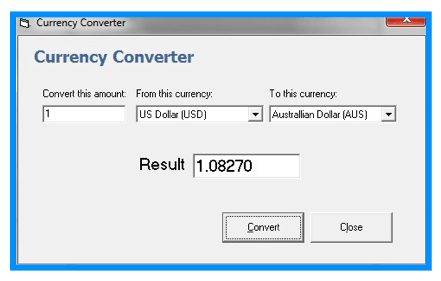
Different countries have different currencies and these currencies have daily variations relative to one another. People must be updated with the latest currency exchange rate while money transfer. So, the currency converter is a mini-Java project that provides a web-based interface for exchanging/converting money from one currency to another. It is developed using Ajax, Java servlets web features. Such applications have used for business, shares & finance-related areas.
/*
 * To change this template, choose Tools | Templates
 * and open the template in the editor.
 */
package com.exchange;

import java.io.*;
import java.net.*;
import java.util.*;
import javax.servlet.*;
import javax.servlet.http.*;
import java.io.InputStream;
import java.net.*;
import com.google.gson.*;

/**
 *
 * @author pakallis
 */
class Recv
{
private String lhs;
private String rhs;
private String error;
private String icc;
public Recv(
{
}
public String getLhs()
{
return lhs;
}
public String getRhs()
{
return rhs;
}
}
public class Convert extends HttpServlet {
    /**
     * Processes requests for both HTTP <code>GET</code> and <code>POST</code> methods.
     * @param request servlet request
     * @param response servlet response
     * @throws ServletException if a servlet-specific error occurs
     * @throws IOException if an I/O error occurs
     */
    protected void processRequest(HttpServletRequest req, HttpServletResponse resp)
            throws ServletException, IOException {
        String query = "";
        String amount = "";
        String curTo = "";
        String curFrom = "";
        String submit = "";
        String res = "";
        HttpSession session;
        resp.setContentType("text/html;charset=UTF-8");
        PrintWriter out = resp.getWriter();
        /*Read request parameters*/
        amount = req.getParameter("amount");
        curTo = req.getParameter("to");
        curFrom = req.getParameter("from");
        /*Open a connection to google and read the result*/

        try {
            query = "http://www.google.com/ig/calculator?hl=en&q=" + amount + curFrom + "=?" + curTo;
            URL url = new URL(query);
            InputStreamReader stream = new InputStreamReader(url.openStream());
            BufferedReader in = new BufferedReader(stream);
            String str = "";
            String temp = "";
            while ((temp = in.readLine()) != null) {
                str = str + temp;
            }

            /*Parse the result which is in json format*/
            Gson gson = new Gson();
            Recv st = gson.fromJson(str, Recv.class);
            String rhs = st.getRhs();
            rhs = rhs.replaceAll("�", "");
            /*we do the check in order to print the additional word(millions,billions etc)*/
            StringTokenizer strto = new StringTokenizer(rhs);
            String nextToken;

            out.write(strto.nextToken());
            nextToken = strto.nextToken();

            if( nextToken.equals("million") || nextToken.equals("billion") || nextToken.equals("trillion"))
            {
                out.println(" "+nextToken);
            }
        } catch (NumberFormatException e) {
            out.println("The given amount is not a valid number");
        }
    }
    // <editor-fold defaultstate="collapsed" desc="HttpServlet methods. Click on the + sign on the left to edit the code.">
    /**
     * Handles the HTTP <code>GET</code> method.
     * @param request servlet request
     * @param response servlet response
     * @throws ServletException if a servlet-specific error occurs
     * @throws IOException if an I/O error occurs
     */
    @Override
    protected void doGet(HttpServletRequest request, HttpServletResponse response)
            throws ServletException, IOException {
        processRequest(request, response);
    }
    /**
     * Handles the HTTP <code>POST</code> method.
     * @param request servlet request
     * @param response servlet response
     * @throws ServletException if a servlet-specific error occurs
     * @throws IOException if an I/O error occurs
     */
    @Override
    protected void doPost(HttpServletRequest request, HttpServletResponse response)
            throws ServletException, IOException {
        processRequest(request, response);
    }
    /**
     * Returns a short description of the servlet.
     * @return a String containing servlet description
     */
    @Override
    public String getServletInfo() {
        return "Short description";
    }// </editor-fold>
}
3. Number Guessing Game
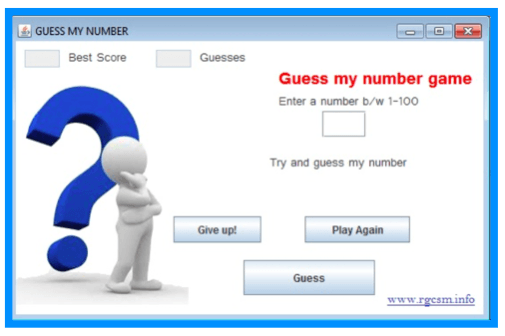
The fun and easy project “Guess the Number” is a short Java project that allows the user to guess the number generated by the computer & involves the following steps:
- The system generates a random number from a given range, say 1 to 100.
- The user is prompted to enter their given number in a displayed dialogue box.
- The computer then tells if the entered number matches the guesses number or it is higher/lower than the generated number.
- The game continues under the user guessing the number.
You can also incorporate further details as:
- Limiting the number of attempts.
- Adding more rounds.
- Displaying score.
- Giving points based on the number of attempts.
Source Code
package guessinggame;
* Java game “Guess a Number” that allows user to guess a random number that has been generated.
*/
import javax.swing.*;

public class GuessingGame {
    public static void main(String[] args) {
        int computerNumber = (int) (Math.random()*100 + 1);
        int userAnswer = 0;
        System.out.println("The correct guess would be " + computerNumber);
        int count = 1;

        while (userAnswer != computerNumber)
        {
            String response = JOptionPane.showInputDialog(null,
                "Enter a guess between 1 and 100", "Guessing Game", 3);
            userAnswer = Integer.parseInt(response);
            JOptionPane.showMessageDialog(null, ""+ determineGuess(userAnswer, computerNumber, count));
            count++;
        }
    }

    public static String determineGuess(int userAnswer, int computerNumber, int count){
        if (userAnswer <=0 || userAnswer >100) {
            return "Your guess is invalid";
        }
        else if (userAnswer == computerNumber ){
            return "Correct!\nTotal Guesses: " + count;
        }
        else if (userAnswer > computerNumber) {
            return "Your guess is too high, try again.\nTry Number: " + count;
        }
        else if (userAnswer < computerNumber) {
            return "Your guess is too low, try again.\nTry Number: " + count;
        }
        else {
            return "Your guess is incorrect\nTry Number: " + count;
        }
    }
}
4. Brick Breaker Game
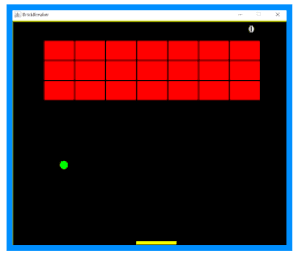
Brick Breaker game consists of bricks aligned at the top of the screen. The player is represented as a tiny ball that is placed on a small platform at the bottom of the screen. The platform can be moved around from left to right on the screen with the help of arrow keys on the keyboard. The player uses the platform to keep the ball running. The goal is to break the bricks without missing the ball with your platform. The project makes use of Java swing, OOPS concepts and much more.
Source Code: Brick Breaker Game
5. Data Visualization Software
The presentation creation and visual representation of data in the graphical or pictorial format are referred to as Data Visualization. Data Visualization has become an active field of research & development by being closely related to information graphics and visualization, statistical graphics and scientific visualization.
The project displays the node connectivity in networking in data visualization form. This node connectivity can be located at different locations via mouse or trackpad. The project has the following goals & objectives:
- Effective and Clear Communication of information using graphical & pictorial means.
- It should have both functionality and Aesthetic.
- It should convey ideas effectively & provide necessary insights into complex sets of data & information.
Data Visualization software makes it easier for the user to understand & grasp the information when they are displayed or represented as charts or graphs rather than report pages.
Source Code: Data Visualization Software
6. ATM Interface

We have all come across ATMs in our cities and it is built on Java. This complex project consists of five different classes and is a console-based application. When the system starts the user is prompted with user id and user pin. On entering the details successfully, then ATM functionalities are unlocked. The project allows to perform following operations:
- Transactions History
- Withdraw
- Deposit
- Transfer
- Quit
Source Code: ATM Interface
7. Web Server Management System
Named as “E-Space” this webserver management system project deals with the information, maintenance and information management of the webserver. Web servers are considered worthy solutions for the companies in this world of fast-moving e-Commerce websites to make their products available over the web.
The project provides solutions for company’s activeness on the internet by providing server maintenance of the company.
The project has the following objectives:
- To identify if the consumer is an individual, business entity or just another web server.
- Trace the physical location of the individual, business entity or web server.
- Consumer known security & privacy policy.
- Identify URL Authorities & URL Names.
- Maintain relationships between consumers & company’s web services.
Source Code: Web Server Management System
8. Airline Reservation System

The project is web-based featuring open architecture that means the app keeps up with the dynamic needs of the airline business by addition of new systems & functionality. The project includes online transaction, fares, inventory & e-ticket operations.
The software consists of four key modules i.e. user registration, login, reservation and cancellation. The app allows communication through a TCP/IP network protocol thereby facilitating the usage of internet & intranet communication globally.


![10 Free Java Projects for Beginners 2021 [With Source Code]](https://lh3.googleusercontent.com/blogger_img_proxy/AEn0k_vxfB54GzbPHeLTKbQ5QyKQVlIVdQ1ItNJ03S9S4LSMS_Phy6jpwH6vXhnD1vog5kUEn8dKD7Js_C8L-ZtFVYkrwvOhBdNl4Yaw3qmioBX8C-ezFWfwxA=w680)

If you have any doubts.please let me know